
TV Mounts & Stands

Shop By
-

Manhattan Wall Mount for TV & Monitors (Full Motion), For screens 32" to 55", VESA compatibility: all between 100x100mm to 400x400mm - check the dimensions of the four mounting holes on back of screen to ensure it fits, Max 35kg, Black, Bracket
Wall Mount for TV & Monitors (Full Motion), For screens 32" to 55", VESA compatibility: all between 100x100mm to 400x400mm - check the dimensions of the four mounting holes on back of screen to ensure it fits, Max 35kg, Black, BracketLogin for pricingIn Stock: 39 available -

Vogel's TVM 3445 Full-Motion TV Wall Mount (black)
TVM 3445 Full-Motion TV Wall Mount (black)Login for pricingIn Stock: 3 available -
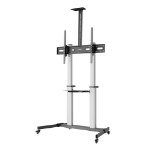
Manhattan Trolley Mount Stand for TV & Monitors, For screens: 37" to 100",VESA compatibility:all between 200x200 to 1000x600mm -check the dimensions of the four mounting holes on back of screen to ensure it fits,Max 80kg,Height adjustable 1200 to 1600mm,L
Trolley Mount Stand for TV & Monitors, For screens: 37" to 100",VESA compatibility:all between 200x200 to 1000x600mm -check the dimensions of the four mounting holes on back of screen to ensure it fits,Max 80kg,Height adjustable 1200 to 1600mm,LFD,BracketLogin for pricingIn Stock: 13 available -

B-Tech Flat Screen Wall Mount with Slide-Out AV Storage Tray (VESA 600 x 400)
Flat Screen Wall Mount with Slide-Out AV Storage Tray (VESA 600 x 400)Login for pricingIn Stock: 5 available -

Manhattan Wall Mount for TV & Monitors (Tiltable), For screens 37" to 65", VESA compatibility: all between 200x200mm to 600x400mm - check the dimensions of the four mounting holes on back of screen to ensure it fits, Max 80kg, Black, Bracket
Wall Mount for TV & Monitors (Tiltable), For screens 37" to 65", VESA compatibility: all between 200x200mm to 600x400mm - check the dimensions of the four mounting holes on back of screen to ensure it fits, Max 80kg, Black, BracketLogin for pricingIn Stock: 25 available -

StarTech.com Articulating TV Wall Mount, VESA Wall Mount, Supports 26 to 65 inch/99lb/Flat/Curved TVs, Retractable Low Profile Wall Mount TV Bracket, Adjustable Corner TV Wall Mount - TAA
StarTech Articulating TV Wall Mount, VESA Wall Mount, Supports 65 inch/99lb/Flat/Curved TVs, Retractable Low Profile Wall Mount TV Bracket, Adjustable Corner TV Wall Mount , TAALogin for pricingIn Stock: 15 available -

Neomounts WL30S-850BL16 TV mount wall 42-86" - fixed - lockable - fast installation
Neomounts LEVEL-850 WL30S-850BL16 Fixed TV mount wall - 42-86" - max 60 kg - VESA 100x100-600x400 - d 3,3 cm - level adjustment - lockable (incl. security screw, excl. lock) - Rapid Install-model incl. fixing template - blackLogin for pricingIn Stock: 1 available -

Manhattan Floor Stand for TV & Monitor Mounts (Ultra Slim), Stand Assembly, For screens: 37" to 55", VESA compatibility: all between 200x200 to 400x400mm - check the dimensions of the four mounting holes on back of screen to ensure it fits, Max 40kg, LFD,
Floor Stand for TV & Monitor Mounts (Ultra Slim), Stand Assembly, For screens: 37" to 55", VESA compatibility: all between 200x200 to 400x400mm - check the dimensions of the four mounting holes on back of screen to ensure it fits, Max 40kg, LFD, BracketLogin for pricingIn Stock: 9 available -

StarTech.com Cubicle Monitor Mount - Cubicle Wall Single Monitor Hanger - Up to 34" (17.6lb/8kg) VESA Mount Display - Height Adjustable Ergonomic Office Cubicle Hanging Flat Panel Hook & Clamp Bracket
StarTech Cubicle Monitor Mount - Cubicle Wall Single Monitor Hanger - Up to 34" (17.6lb/8kg) VESA Mount Display - Height Adjustable Ergonomic Cubicle Hanging Panel Hook&Clamp Bracket (ARMCBCLB)Login for pricingIn Stock: 12 available -
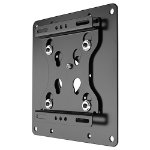
Chief FSR1U, Small Flat Panel Fixed Wall Display Mount
FSR1U, Small Flat Panel Fixed Wall Display MountLogin for pricingIn Stock: 4 available